How to connect and use our Klaviyo integration to screen and auto suppress users with your flows
Table of Contents
How Mail Ward's Klaviyo integration works
How syncing data works between Klaviyo and Mail Ward
Connecting Mail Ward to Klaviyo
Understanding your Mail Ward data
Screened By Mail Ward
Suppressed By Mail Ward
What you can do in Klaviyo with Mail Ward data
Create engaged segments based on scores
Send email confirmation messages
Monitor deliverability health
Automate suppression management
Personalize communication based on deliverability risk
Prerequisites: Must have an account created in both Mail Ward and Klaviyo
How Mail Ward's Klaviyo Integration Works
The core value of pairing Mail Ward with Klaviyo is twofold: you get enriched deliverability data on every contact Mail Ward screens, and you can automatically suppress contacts whose deliverability score falls below your threshold, before they ever affect a send.
Data that is received from Klaviyo is the email address but this is never stored in Mail Ward. Mail Ward will send a
Screened By Mail Ward
event for every user that gets received from Klaviyo and this includes information about the email address received. Mail Ward will also send a
Suppressed By Mail Ward
event if this is enabled in the preferences.
In Klaviyo you have the ability to then segment customers or trigger further flows as well as create dynamic email content with the data from Mail Ward.
How Syncing Data Works Between Klaviyo and Mail Ward
We use webhooks from Klaviyo to receive email addresses in real-time. Our system then processes each email address with our internal validation tool and sends responses back to Klaviyo immediately with no delays, ensuring your flows remain responsive and efficient.
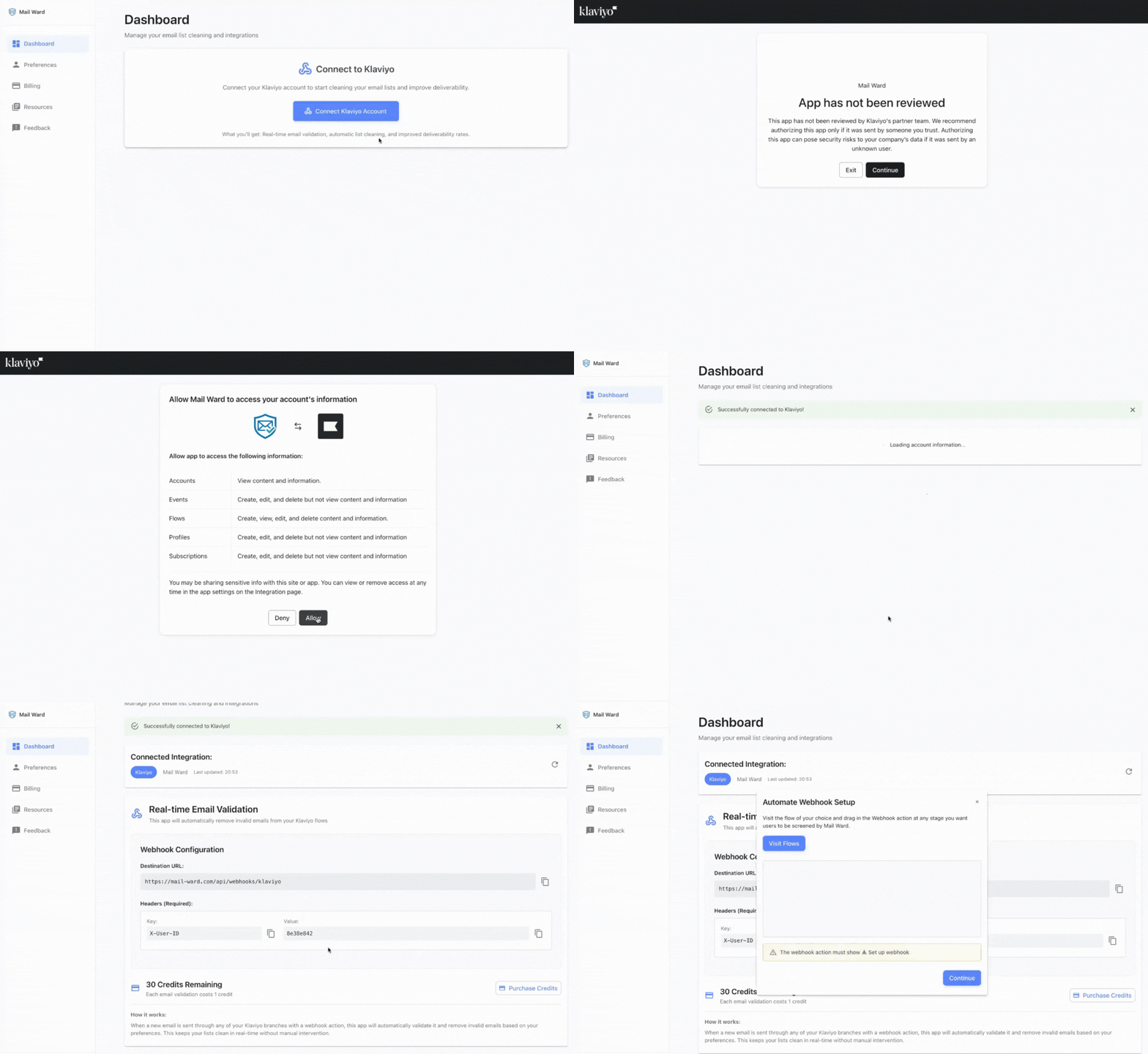
Connecting Mail Ward to Klaviyo
1
Within the Mail Ward dashboard, select
Connect Klaviyo Account
2
Add an empty webhook action to your desired flow. No settings required.
3
Choose either the manual or the automatic setup guide on the dashboard.
4
Visit the Preferences section to decide how screened profiles are handled.
Understanding Your Mail Ward Data
Mail Ward sends two events to Klaviyo:
Screened By Mail Ward
Suppressed By Mail Ward
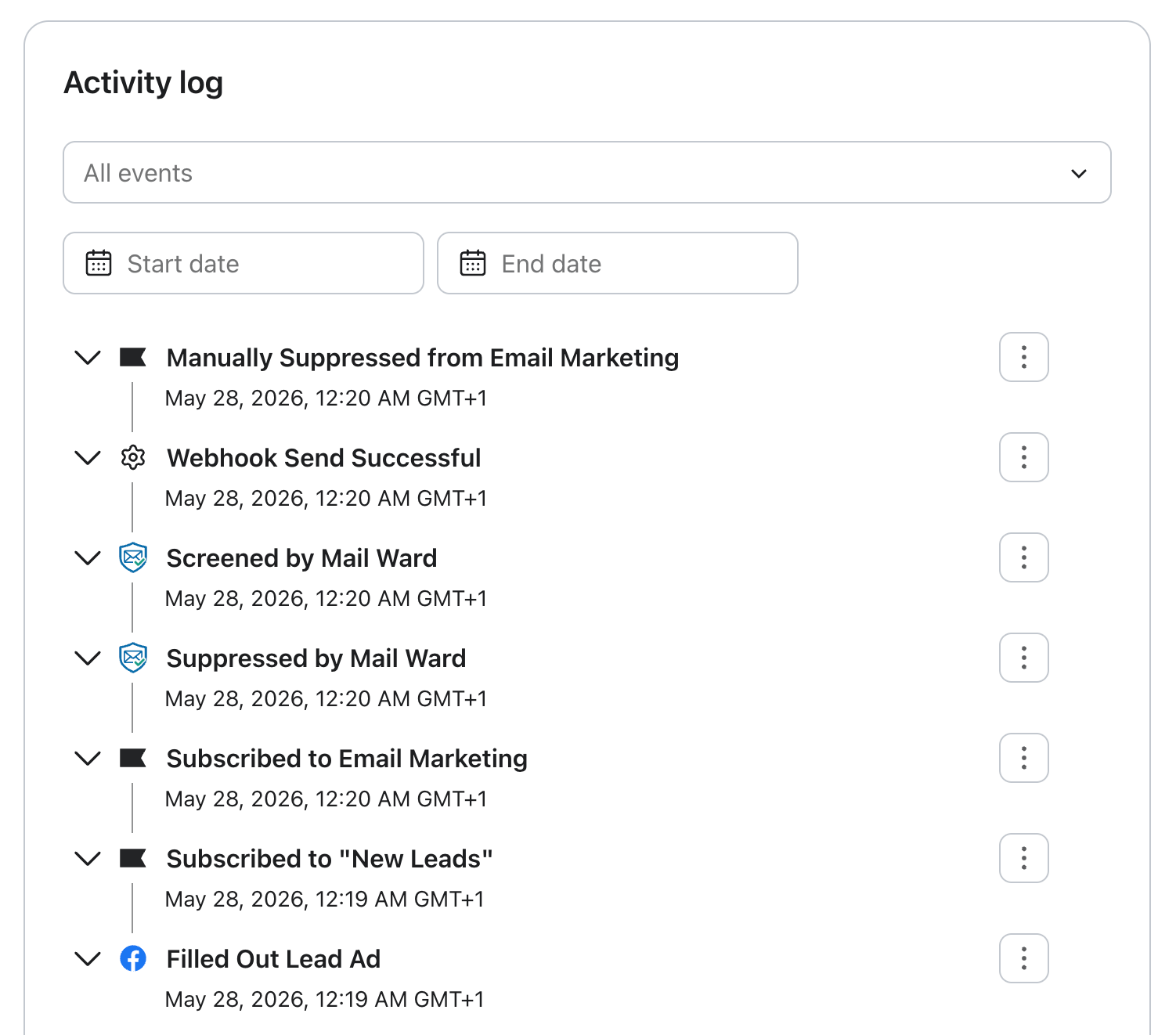
Here's the full chain reaction in a Klaviyo profile's activity log: a contact joins from a Facebook lead ad, enters a flow, and is picked up by the webhook and screened by Mail Ward. Because the account's preferences flagged it as a spam profile, it is suppressed automatically. The timestamps show it all happens instantly.
Screened By Mail Ward
This event is tracked whenever an email address is screened through Mail Ward. The event includes deliverability and quality insights about the address so you can use this data to automatically suppress risky or invalid contacts, or personalize your sending strategy based on deliverability health.
You can filter and target Screened by Mail Ward events based on the following properties:
Property
Description
Auto Suppressed
Indicates whether the contact was automatically suppressed after screening.
Deliverability Status
The result of Mail Ward's verification for this address. Possible values include deliverable, undeliverable, or risky.
Free Domain
Shows whether the email uses a free email service provider (e.g., Gmail, Yahoo, Outlook).
Domain
The domain portion of the email address.
Mailbox Full
Identifies if the mailbox was reported as full, which may cause temporary bounces.
Suspected Role Domain
Indicates whether the domain is associated with a group or role-based address (e.g., support@, admin@).
Score
A numeric quality score (0 to 100) representing how likely the address is to be valid and receive emails successfully.
No Reply Address
Flags addresses that appear to be "no-reply" inboxes, which typically shouldn't receive messages.
Disposable Domain
Indicates if the email comes from a temporary or disposable email provider.
Reason
Provides a short description explaining the screening outcome.
Email
The full email address that was screened.
Suppressed By Mail Ward
This event is triggered when a contact is automatically suppressed by Mail Ward because their email quality score does not meet the minimum threshold set in your suppression preferences. The event includes details about why the suppression occurred and when the request was sent to Klaviyo. You can use this data to track suppression activity, audit deliverability decisions, or trigger workflows when a contact becomes suppressed.
You can filter and target Suppressed by Mail Ward events based on the following properties:
Property
Description
Suppression Reason
The reason the contact was suppressed, typically based on the deliverability status or validation result.
Score
The email's quality score (0 to 100) at the time of suppression.
Suppression Request Timestamp
The date and time Mail Ward sent the suppression request to Klaviyo.
What You Can Do in Klaviyo with Mail Ward Data
Create Engaged Segments Based on Scores
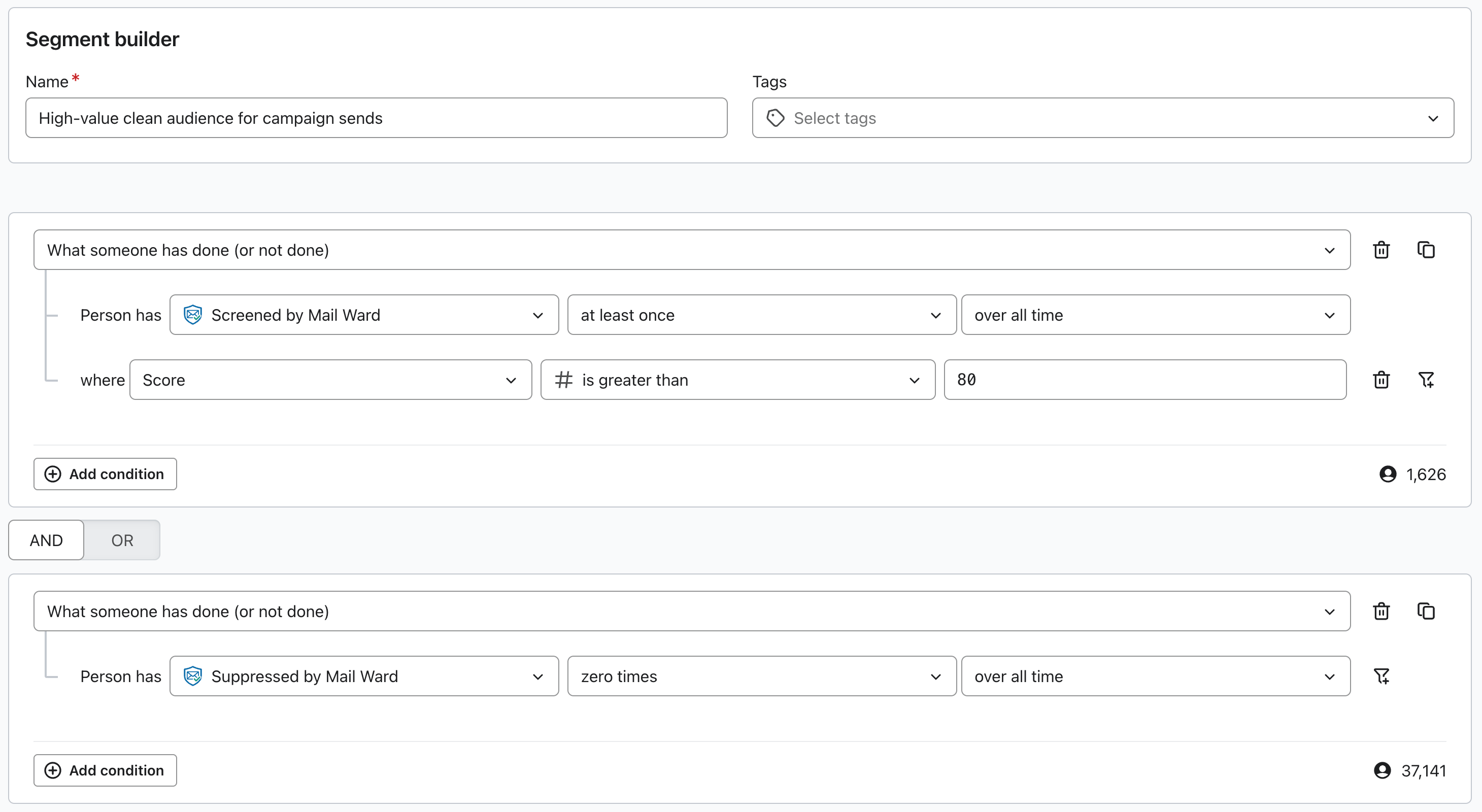
Use the Score property to build dynamic segments that target only your most deliverable and engaged contacts. For example, you might create a segment for contacts with a score of 80 or higher to ensure your campaigns go to valid, high-quality email addresses. You can also exclude lower-scoring contacts (e.g., below 60) from campaigns to reduce bounces and improve inbox placement.
Send Email Confirmation Messages
For addresses that fall into a "risky" score range, you can trigger an automated email confirmation or double opt-in flow. This allows those contacts to verify their address and move back into your engaged audience if valid, while keeping your main list clean and compliant.
Monitor Deliverability Health
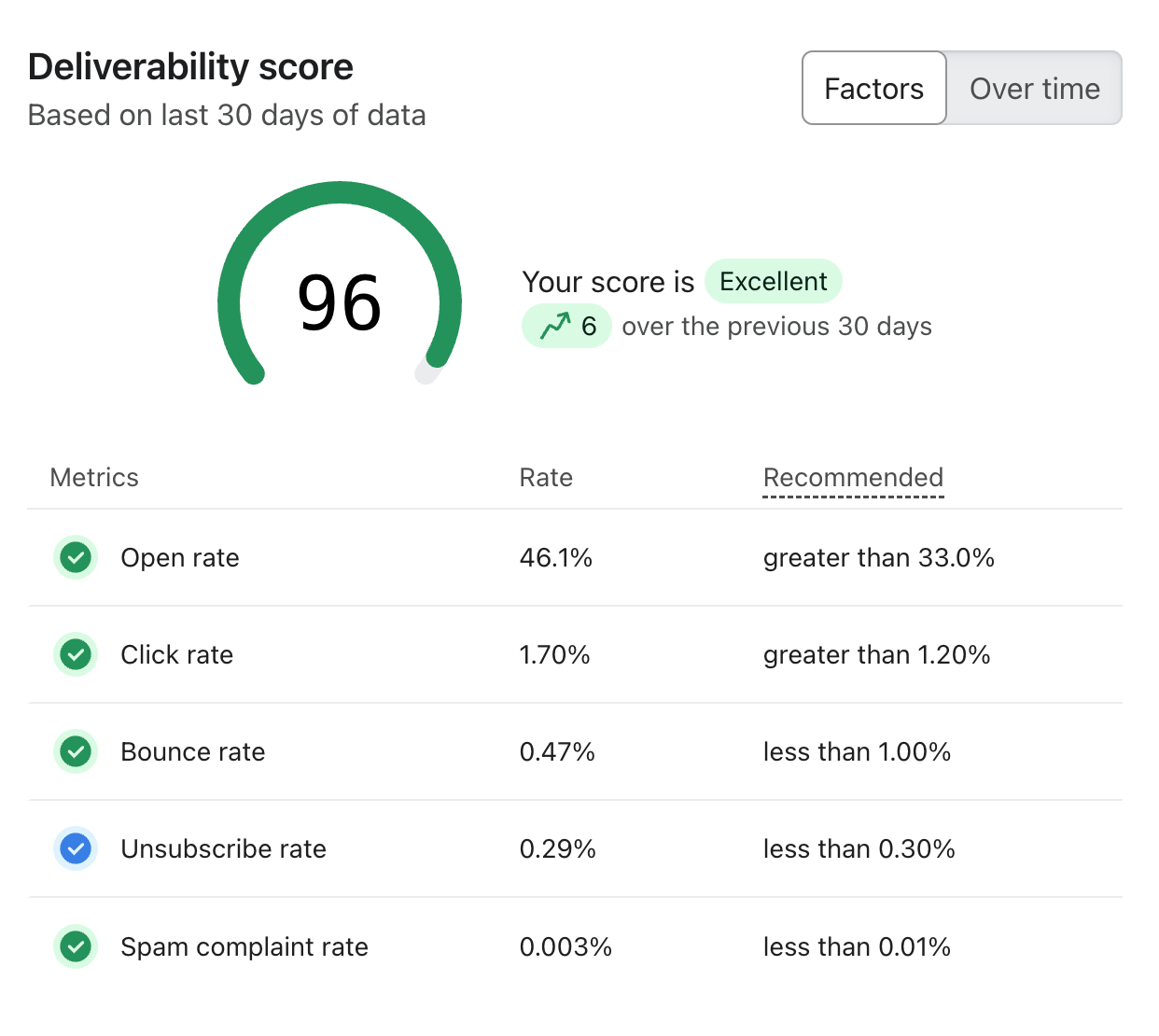
Track changes in deliverability trends by analyzing Mail Ward events like Screened by Mail Ward and Suppressed by Mail Ward. This helps you understand how many contacts are being screened, what percentage are risky or undeliverable, and how your suppression thresholds affect list quality. The example below shows a real Klaviyo sender score climbing steadily after auto-suppression was switched on.
Automate Suppression Management
Use Mail Ward's suppression data to automatically manage who can receive emails from your Klaviyo account. Contacts that no longer meet your quality standards are suppressed in real time, preventing accidental sends to undeliverable addresses and protecting your sending reputation.
Personalize Communication Based on Deliverability Risk
Adjust messaging for lower-score contacts, such as using lighter-weight transactional templates or alternative channels like SMS, to maintain engagement while minimizing bounce risk.
Need help getting started? Connect your Klaviyo account from your dashboard.